Search This Blog

Saturday, July 22, 2017


Write your own functions. We know the programs we have seen before that is included only one function: main ( ) . But we can use one more prototype functions. How to use prototype function I just shown below.


#include<stdio.h>
void func1(void);
void func2(void);
void func3(void);
int main(void)
{
    printf("  What is your name: ?\n");
    func1();
    printf("  Where are you from: ?\n");
    func2();
    printf("  What is your university name: \n");
    func3();

    return 0;

}
void func1(void)
{
    printf("  My name is: Suruj \n");
}
void func2(void)
{
    printf("  I am from Kushtia \n");
}
void func3(void)
{
    printf("  United International University (UIU). \n");
}


Output
Also you can write down like this........................

#include<stdio.h>
 int main()
 {
     printf(" What is your name: ?\n\n");
     func1();

     return 0;

 }
 void func1(void)
 {
     printf(" My name is: Suruj. \n");

 }


Output


[N.B: If any body have any kinds of problem, then you can comment below. Thank you ]


Friday, March 17, 2017


Here I write a mixed code (additional & subtraction) both. Where I use 4 variable that is for integer number. If anyone wants to use floating point number or double number. Then just write float a,b,c,d,sum. then write your code and use %f  for taking your floating or double number. You can also use more variable that you want. If you have to need more variable then you have to use array[ ]. That is different.


#include<stdio.h>
int main()

{
    int a,b,c,d,mix;

    printf("Please enter your 1st value: ");
    scanf("%d",&a);
    printf("Please enter your 2nd value: ");
    scanf("%d",&b);
    printf("Please enter your 3rd value: ");
    scanf("%d",&c);
    printf("Please enter your 4th value: ");
    scanf("%d",&d);

    mix=a+b-c+d;
    printf("\nYour total number is: %d\n",mix);


    return 0;


}

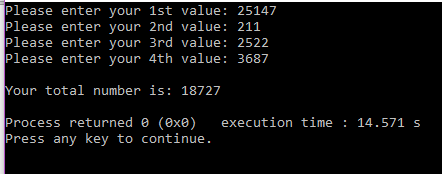
[N.T: Please notice that I just change the sign of (+) or (-) and same code as addition and subtraction . ]


Output of above code.


Here I write a code for subtraction. Where I use 4 variable that is for integer number. If anyone wants to use floating point number or double number. Then just write float a,b,c,d,sum. then write your code and use %f  for taking your floating or double number. You can also use more variable that you want. If you have to need more variable then you have to use array[ ]. That is different.


#include<stdio.h>
int main()

{
    int a,b,c,d,sub;

    printf("Please enter your 1st value: ");
    scanf("%d",&a);
    printf("Please enter your 2nd value: ");
    scanf("%d",&b);
    printf("Please enter your 3rd value: ");
    scanf("%d",&c);
    printf("Please enter your 4th value: ");
    scanf("%d",&d);

    sub=a-b-c-d;
    printf("\nYour total number is: %d\n",sub);


    return 0;


}


[N.T: Please notice that I just change the sign of (+) to (-) and same code as addition. ]

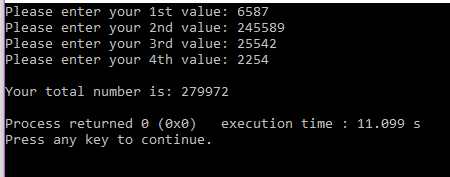
Output of above code.


Here I write a code for addition. Where I use 4 variable that is for integer number. If anyone wants to use floating point number or double number. Then just write float a,b,c,d,sum. then write your code and use %f  for taking your floating or double number. You can also use more variable that you want. If you have to need more variable then you have to use array[ ]. That is different.


#include<stdio.h>
int main()

{
    int a,b,c,d,sum;

    printf("Please enter your 1st value: ");
    scanf("%d",&a);
    printf("Please enter your 2nd value: ");
    scanf("%d",&b);
    printf("Please enter your 3rd value: ");
    scanf("%d",&c);
    printf("Please enter your 4th value: ");
    scanf("%d",&d);

    sum=a+b+c+d;
    printf("\nYour total number is: %d\n",sum);


    return 0;


}

Output of above code.


Tuesday, September 13, 2016

Design an x-y plot for the following where the values of x are from 0 to 20pi with a spacing of pi/100.

Question:


       Design an x-y plot for the following where the values of x are from 0 to 20pi with a spacing of           pi/100.
a.           y=x.sin(x)
b.          z=x.cos(x)

c.          convert the above 2D into a 3D plot using z as the third axis

To accept two numbers from the user and display Armstrong numbers between these two numbers

Question:


To accept two numbers from the user and display Armstrong numbers between these two numbers

  Answer:

a = input(' Enter your 1st number: ');
b = input('\n Enter your 2st number: ');

for i = a:b
if isprime(i)
fprintf('%d, ', i)
end
end
fprintf('\n')

Output:

                  Enter your 1st number: 1
                  Enter your 2st number: 100

2, 3, 5, 7, 11, 13, 17, 19, 23, 29, 31, 37, 41, 43, 47, 53, 59, 61, 67, 71, 73, 79, 83, 89, 97, 

To accept two numbers from the user and display perfect numbers between these two numbers


Question:

To accept two numbers from the user and display perfect numbers between these two numbers


clc
num1 =input(' Enter your 1st number: ');
num2 =input('\n Enter your 2st number: ');
output = zeros(1,num2);
for i = num1:num2
if true
end

test = 1:i-1;
if (sum(test(mod(i,test) == 0)) == i)
output(i) = i;
end
end

output(output == 0) = []

Output: I just write in command window

       
                  Enter your 1st number : 1
                      Enter your 2st number : 100


       output =

                      6    28